
Selling a product on Etsy tells you how much the customer paid.
It doesn't necessarily tell you how much you made.
That's the problem the Maker Forge Etsy integration is designed to solve.
By connecting your Etsy shop to Maker Forge, your orders can flow into the same system where you already track your materials, components, production time, product costs, and pricing.
Instead of treating Etsy as a separate pile of sales data, Maker Forge connects those sales back to the products you actually make.
The result is a much clearer picture of what you're earning from each order.
Connect Your Etsy Shop
Getting started is simple.
From Maker Forge, connect your Etsy shop and authorize access to your shop through Etsy.
Maker Forge can then import supported order information directly from Etsy.
There's no need to manually recreate every Etsy sale inside Maker Forge.
Your Etsy orders become part of your Maker Forge order history alongside orders you've entered manually.
Map Etsy Listings to Your Maker Forge Products
An Etsy listing and a Maker Forge product aren't necessarily the same thing.
That's important.
Your Etsy shop might have a listing called:
Personalized Walnut Dice Tower
while your Maker Forge product may simply be:
Walnut Dice Tower
Maker Forge lets you map the Etsy item to the correct Maker Forge product.
Once that relationship is established, Maker Forge can connect future imported orders with the product costing information you've already built.
That means you don't have to recreate your product costs every time you make a sale.
Your Etsy Orders Become Part of Your Product History
Once an imported order is mapped to a product, it doesn't live in some disconnected "integration" area.
It becomes part of that product's order history.
You can see things such as:
- When the product sold
- Which sales channel it came from
- Selling price
- Quantity
- Maker earnings
- Business earnings
- Gross margin
- Whether information is still needed to calculate profitability
This is where the Etsy integration becomes especially useful.
You're not just importing orders.
You're connecting sales activity to product economics.
Maker Forge Remembers What the Product Cost When the Order Was Recorded
Product costs change.
Walnut might cost more next month.
Packaging might get cheaper.
You might change suppliers.
Your production process might become faster.
That shouldn't rewrite the profitability of an order you already recorded.
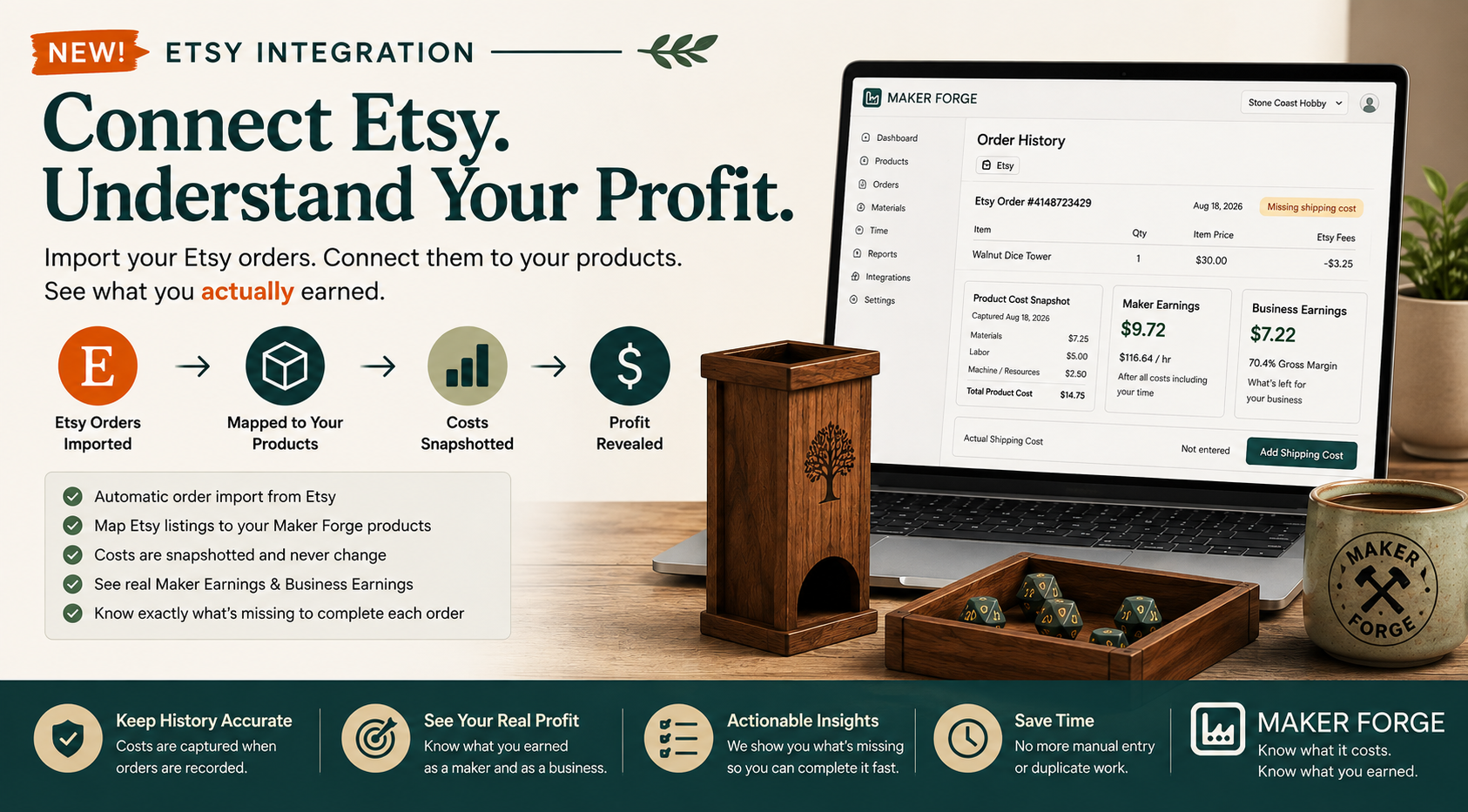
When an Etsy order is imported and associated with a Maker Forge product, Maker Forge captures a cost snapshot for that order.
Suppose a product currently costs:
- $7.25 in materials
- $5.00 in hands-on labor
- $2.50 in machine or resource costs
Your product cost is $14.75.
An order imported today records that cost.
If the same product costs $17.40 several months from now, the historical order still retains its original $14.75 cost snapshot.
Your old profitability doesn't change just because your current costs changed.
That's important if you want Maker Forge to answer a deceptively simple question:
What did I actually earn on that sale?
Maker Forge Tells You When Something Is Missing
Sometimes Etsy doesn't have every piece of information Maker Forge needs to calculate your actual earnings.
Shipping is a good example.
Maker Forge doesn't simply pretend that an incomplete calculation is accurate.
Instead, the order can tell you exactly what's missing.
For example:
Missing shipping cost
You can fix the missing information directly from the product's order history.
Enter the actual shipping cost, save the order, and Maker Forge recalculates the profitability.
The goal is to make incomplete data actionable, rather than burying it in a report.
Imported Data Stays Imported Data
Maker Forge also keeps track of where information came from.
If Etsy reports the selling price, quantity, order number, or other marketplace information, those values are treated as information from Etsy.
Maker Forge adds the information Etsy doesn't know about your business, such as:
- Your product cost
- Material costs
- Production time
- Labor costs
- Actual shipping costs
- Packaging and other costs
- Product mappings
- Profitability
This keeps the responsibilities clear.
Etsy tells us about the transaction.
Maker Forge helps you understand what that transaction meant for your business.
Maker Earnings vs. Business Earnings
One of the reasons we built Maker Forge was that "profit" can mean different things to a maker.
If you spend 15 minutes making something, your time matters.
But there's also value in understanding how much money remains for the business after accounting for that labor.
That's why Maker Forge can look at an imported Etsy order from multiple perspectives.
Maker Earnings
What did you earn from the work you performed?
Business Earnings
What did the business retain after accounting for its costs?
Those numbers can tell a much more useful story than simply looking at the Etsy selling price.
Why Not Just Use Etsy's Sales Numbers?
Etsy knows a lot about an Etsy transaction.
Maker Forge knows a lot about the product.
That's the difference.
Maker Forge can understand that a product uses specific materials and components, requires a certain amount of hands-on work, consumes machine or resource time, has particular costs, and needs to meet the profitability goals you've established for your business.
Connecting Etsy lets us bring those two sides together.
Your Etsy Order
      ↓
Your Maker Forge Product
      ↓
Product Cost Snapshot
      ↓
Actual Order Costs
      ↓
Maker Earnings
      ↓
Business Earnings
Instead of asking only:
"How much did I sell?"
you can start asking:
"What am I actually earning from the things I'm making?"
Designed for Makers, Not Accountants
You shouldn't need to become an accountant to understand whether a product is worth making.
The Etsy integration follows the same philosophy as the rest of Maker Forge.
Connect your shop.
Map your products.
Let your orders come in.
If Maker Forge needs something from you, it tells you what is missing.
Then get back to making.
The complicated calculations happen behind the scenes.
Your Orders Are Still Your Orders
Connecting Etsy doesn't create a completely separate Etsy version of Maker Forge.
An order is an order.
Whether you manually enter an order today or Maker Forge imports one from Etsy, it ultimately becomes part of the same product and profitability history.
That also means Maker Forge can continue adding other ways to bring orders into the system without changing how you analyze your business.
Etsy is simply one way your sales can reach Maker Forge.
Built for the Question That Matters
Sales are exciting.
Revenue is important.
But neither tells the whole story.
A $50 sale isn't necessarily better than a $35 sale if the $50 product takes three times as long to make or consumes substantially more materials.
Maker Forge was built around a different question:
What am I actually earning from the things I make?
The Etsy integration makes answering that question easier because your real Etsy orders can now meet the costing information you've already built inside Maker Forge.
No duplicate entry.
No constantly updating spreadsheet.
No trying to remember what a product used to cost.
Just your products, your orders, your costs, and a clearer picture of what you're actually earning.
Ready to Connect Your Etsy Shop?
If you're already using Maker Forge, open your integrations page and connect Etsy to start bringing your orders into your product profitability workflow.
If you're new to Maker Forge, you can start by building the costs of the products you sell and then connect your Etsy shop to see how those costs translate into real-world orders.
Know what it costs. Know what you earned. Make better decisions about what to make next.
The term 'Etsy' is a trademark of Etsy, Inc. This Application uses Etsy's API, but is not endorsed or certified by Etsy.